# Email notifications
### **E-mail message text settings**
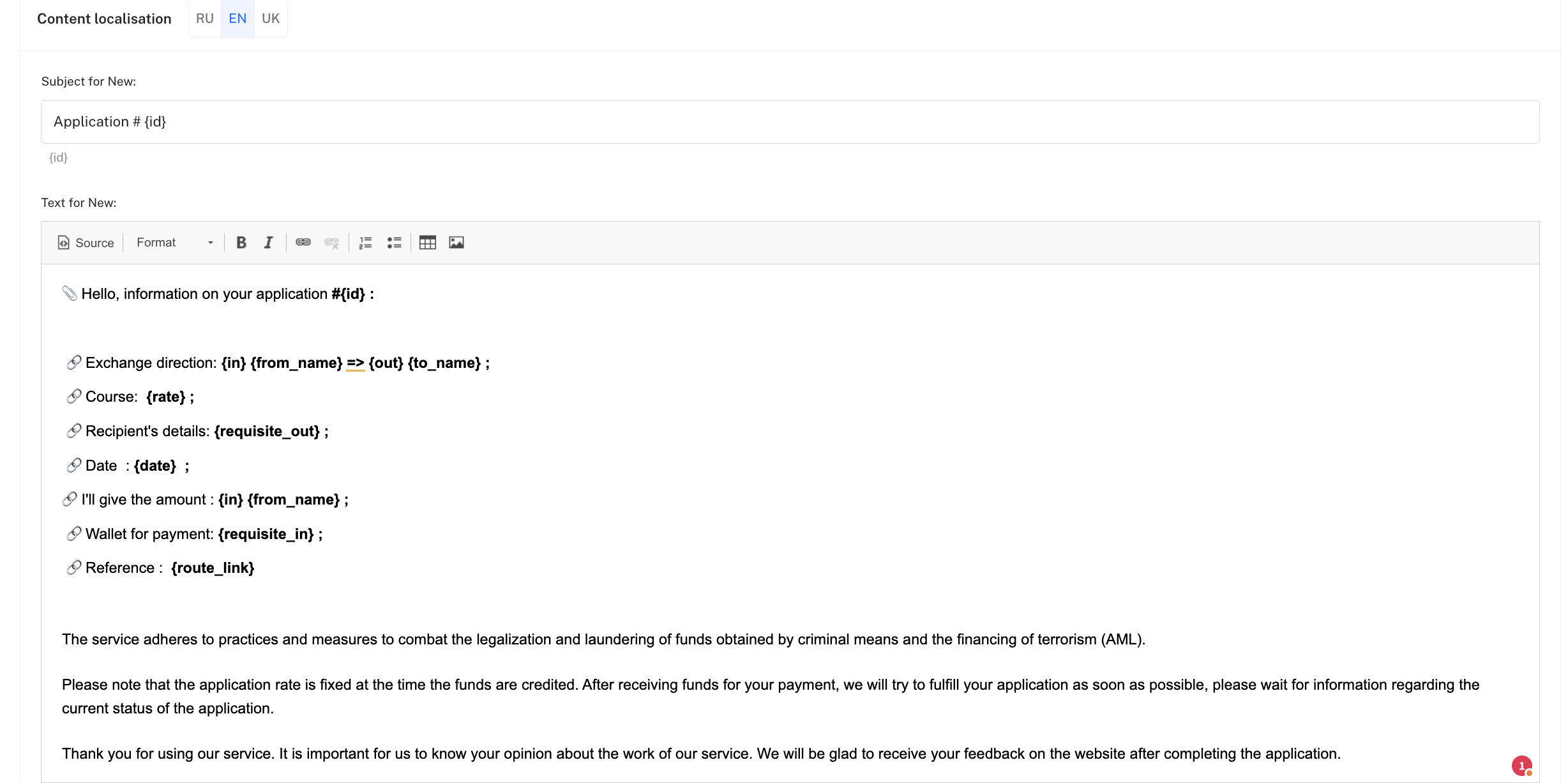
There is a separate page in the system **Email messages**, where the administrator can set templates for all types of emails that clients receive. This allows customizing both the subject of the email and its content, inserting variable data.
### **Main settings**
* **Sender email** — the e-mail from which users receive all messages.
* **Sender name** — the signature in the "From" field.
### **Content localization**
There are separate fields for each event type:
* **Email subject** — the text the user sees in the subject line.
* **Email body (content)** — the main text of the message.
Among the types of emails:
* 📩 **New request**
* 🗑️ **Deleted request**
* ⚠️ **Request error**
* ⏳ **Request under review**
* ✅ **Completed request**
* 🕒 **Awaiting confirmation**
* 🔄 **Pending auto-payout**
* 💵 **Paid by user**
* 🔍 **AML check**
* 📝 **Registration**
* 🔑 **Password recovery**
* 🛡️ **Verification (approved/rejected)**
* 🧾 **Receipt upload**
### **Template variables**
In texts and subjects you can use **variables (placeholders)**, which the system automatically replaces with user or request data:
* {id} — request id
* {amount} — amount
* {currency} — currency
* {wallet} — wallet
* {name} — user name
* {from\_annotation} — additional sender data
* {to\_annotation} — additional recipient data
* {receive} — amount to be received
* {confirmations\_count} — number of confirmations
* {date} — date and time of request creation in the format "DD.MM.YYYY, HH:MM"
* {rate} — exchange rate
* {requisite\_in} — details for sending funds (incoming)
* {requisite\_in\_memo} — additional information/note for incoming details
* {requisite\_out} — details for receiving funds (outgoing)
* {from\_name} — full localized name of the currency being given (from)
* {to\_name} — full localized name of the currency being received (to)
* {route\_link} — full link to the order page with token
* {in} — amount that the client gives
* {out} — amount that the client receives
* {city} — city name
* {city\_country} — city with country indicated in the format “City (Country)” for cash exchanges
* {confirmations\_count} — number of confirmations for the incoming currency
* {psys\_give} — short code of the currency being given
* {psys\_get} — short code of the currency being received
Thus, emails always contain up-to-date information unique to a specific user.
### **Advanced features**
* ✨ **HTML markup** — the administrator can use HTML code in texts to create stylish messages (for example, color highlights, tables, buttons linking to the site).
* 🖼️ **Images and banners** — via HTML you can add the company logo, icons, or any other graphical elements.
* 🎨 **Custom design** — thanks to HTML and styles (CSS) you can make templates as close as possible to branded mailings.