# Required Cloudflare settings
## Correct loading of JavaScript chunks (Next.js)
Your site is proxied through Cloudflare and uses a modern frontend framework [Next.js](http://next.js/). JavaScript files (chunks) are loaded **dynamically** and **tightly bound to the site's build version**. With default Cloudflare settings it may:
* cache outdated JS chunks
* return script loading errors
* serve different file versions to different users
As a result, some visitors may experience incomplete loading or unstable behavior. The reason is that Cloudflare applies **default caching** to JavaScript files without considering: dynamic chunk generation, site updates, interdependence of chunks
## **Recommended solution**
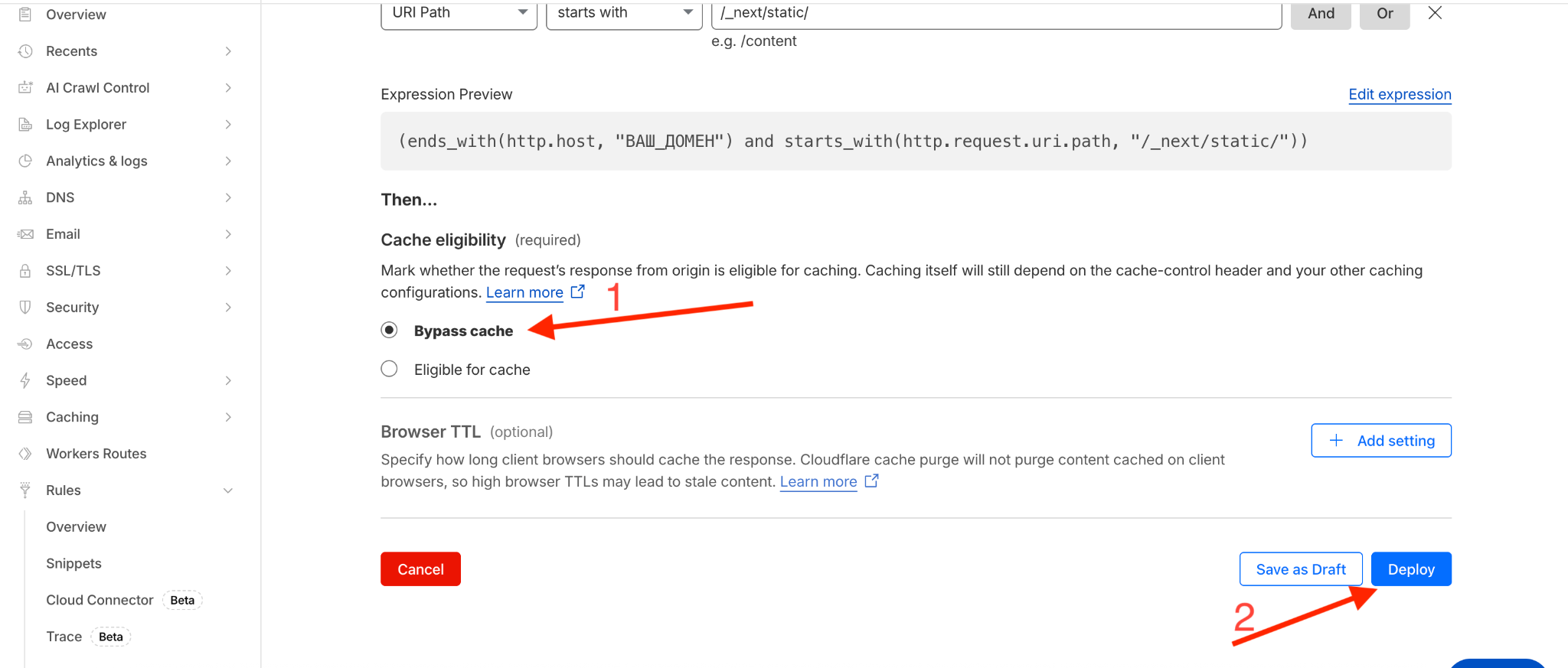
Create a cache rule in Cloudflare. To do this you need to log into your Cloudflare and go to the **Rules-> Overview,** click the **Create Rule**button and select **Cache Rules**

In the opened window you need to enter the rule name in the **Rule name**field. Then below you need to fill in the condition as shown in the example **Replace YOUR\_DOMAIN with your site's domain without https\://**
After entering the condition select the action **Bypass cache** and save the rule with the **Deploy.**