# BestChange Parser
**BestChange Parser** — is a tool that automatically tracks your exchanger's positions in the BestChange monitoring and adjusts the exchange rate to maintain the desired ranking position.
After configuration the system will:
* retrieve current rates from BestChange via the API
* find your exchanger's position among competitors
* automatically adjust the rate to maintain the specified position
For example:
If you specified **Target Position = 6**, the system will make the rate **0.0001% better**than the exchanger that is currently in **6th place**.
Thus you will **automatically maintain the desired position in the BestChange listing** without manually changing rates.
## General tab
In this tab the **global parser settings are performed**.
### Enable Parser
**Enable Parser** — the global switch for parser operation.
Possible values:
* **Yes** — the parser is enabled and running
* **No** — the parser is disabled
If the switch is off — the parser **will not process any direction**, even if they are active.
### BestChange API Key
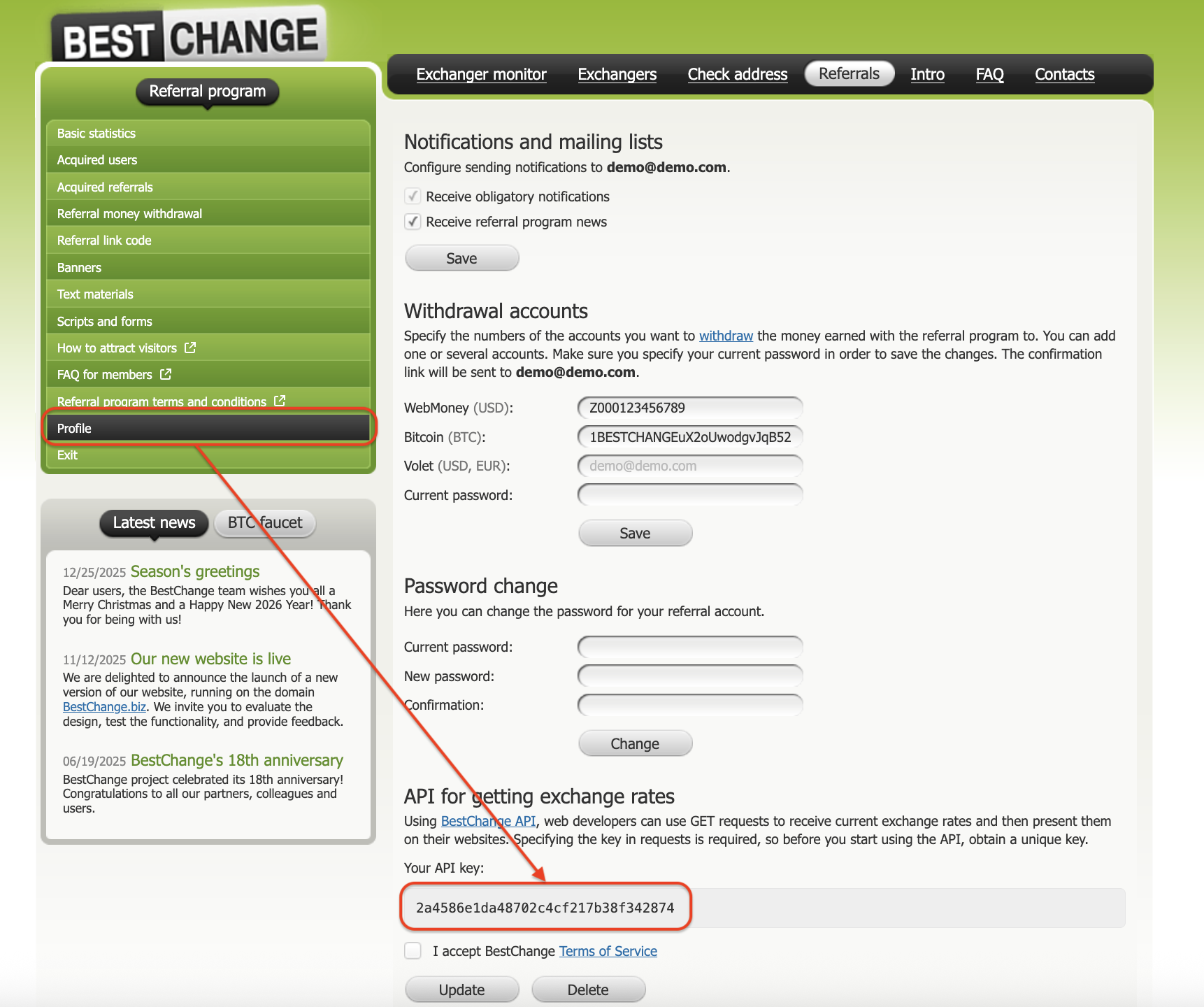
**BestChange API Key** — the access key for the BestChange API.
Through this key the system receives:
* the list of currencies
* the list of exchangers
* current rates
* exchangers' positions
#### Where to get the API key
The API key is issued in the personal account and is described in the BestChange API documentation.
Example of a test key:
```
20cfsnaf25501bscjdsadodsowe255es
```
Example request:
```
https://www.bestchange.app/v2/20cfsnaf25501bscjdsadodsowe255es/currencies/
```
API Documentation:\
### Your BestChange Changer ID
**Changer ID** — is the unique identifier of your exchanger in the BestChange system.
It is needed by the parser to:
* determine **your exchanger in the list**
* determine **your current position**
* correctly compare rates with competitors
#### Where to find your Changer ID
You can get the ID via the BestChange API.
Open the link:
```
https://www.bestchange.app/v2/YOUR_API_KEY/changers/
```
Example:
```
https://www.bestchange.app/v2/20cfsnaf25501bscjdsadodsowe255es/changers/
```
The API response will contain a list of exchangers, for example:
```
{
"id": 1234,
"name": "YourExchange"
}
```
The number **id** is your **Changer ID**, which must be specified in the admin panel.
## Directions tab
In the **Directions** tab you configure the exchange directions for which the parser will operate.
You can add **an unlimited number of directions**.
### Direction
**Direction** — the exchange direction for which the parser will operate.
Example:
```
USDCERC20 -> BTC
```
This means:
* we give **USDC ERC-20**
* we receive **BTC**
The parser will analyze **competitors specifically for this direction** on BestChange.
### Target Position (1–40)
**Target Position** — the position in the BestChange ranking that must be maintained.
Allowed range:
```
1 — 40
```
Example:
```
2
```
This means:
the system will automatically change the rate so that your exchanger is **in second place**.
Operating algorithm:
1. the parser retrieves the list of exchangers for the direction
2. determines the rate of the exchanger at the required position
3. sets the rate **0.0001% more favorable**
4. updates the rate once per minute
### Active
**Active** — turns the parser on or off for a specific direction.
Possible values:
* **Yes** — the parser is running
* **No** — the direction is ignored
Important:
Even if the direction is active, the parser **will not operate**, if the global switch **Enable Parser = No**.
## How the parser works
Operating algorithm:
1. A cron job is started.
2. The system sends a request to the BestChange API.
3. Receives the list of rates for the direction.
4. Determines your exchanger's position.
5. If the position is lower than specified — the system adjusts the rate.
All actions are recorded in the table:
```
HistoryExecution
```
It stores:
* execution time
* direction
* retrieved rates
* new position
* rate changes
This allows **to track the parser's operation and the history of changes**.
## Plugin cost
The plugin **BestChange Parser** is paid.
Cost:
```
$40 / month
```
Also available **a free 14-day trial period**.